
First Ride DMD2 Impressions After a Real Adventure Trip
It wouldn’t have taken much to notice that my adventure bike was running a new navigation system on the last ride, so I thought I’d dump down my initial thoughts after using the DMD-T880X on a proper trip, coming from the Garmin Zumo.

First Impressions
This was my first proper trip using the DMD2 on the BMW. My biggest takeaway is that this unit is designed for riding beyond the easy path. It is something that has clearly been designed specifically for riding, not just renaming “Driving to location” to “Ride.” Wait, actually, the last unit didn’t even do that.
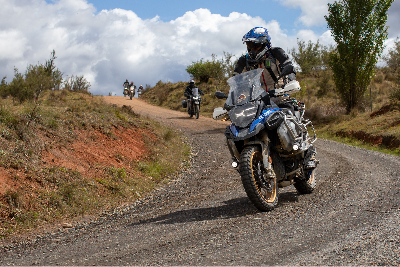
Okay, so straight off the bat, you can probably read between the contour lines to see that I’m not missing my Garmin. Having said that, there are still some things the Garmin does very well, so I’ll touch on some of the differences, but this isn’t going to be a let’s now crap all over the Garmin therapy session.
Track rather than route-focused
Google Maps is route-focused. You give it a destination, it knows where you are, and it calculates a route to that location in real time. Simple, but requires an internet connection to insanely powerful servers that calculate that path as quickly as a sausage roll disappears after 100 km of dirt roads. Which is fine until you’re in the bush without a connection.
Adventure Riding often involves following a specific path, which is why DMD feels natural with Tracks. On the 2026 Big Bore ride, Vagabond Moto provided the GPX files, which I was able to easily save and access via Google Drive since the DMD is a Android based system. Never have I had an easier way to sync files, and no more stress of syncing mobile phones or transferring via SD cards, although that option is there if needed.
Then, when it came time to hit the road, I couldn’t find the big “Go” button. How do I start this thing and follow the track? Turns out, it just does it. A simple tap of a little eye icon puts the Track on the map, and, like a creepy ex-girlfriend, it will just attach instantly as soon as you get near it. You can even have multiple Tracks on the map at once, and you can prioritise the one you want to follow, and have other tracks for breakouts or, as I like to have, escape routes when you feel like taking the gentleman's route instead.
A display will then show you an ETA and the distance to the end of the Track, and if you have Waypoints included in the Track, it will show you the distance to the next one. That was my bread and butter while I was riding. The only thing I was missing from the Garmin was an ETA to the intermediate waypoints, but as long as I have an ETA to the end, so I know I’m going to get to the pub before dinner, that’s what matters most.

Views and Must-have optional extra
The remote controller for the handlebars is the best thing ever! I know it’s an investment, but it is worth every cent. Being able to zoom in and out without your hand leaving the grip is very handy, but my favourite feature was the remote's main buttons for switching between views. In the settings, you can select which views you want to toggle between, but my favourites were;
Follow Mode T - Bound Active Track/Route - to be able to see your progress on the path through the whole day,
Follow Mode N - Next Waypoint / Indication - see the path between your position and the next waypoint, and
Default follow view
I also programmed the second button on the remote to toggle autozooming on and off. When I knew an intersection was coming up, or we were in a built-up area, then AutoZoom made it easier to see exactly which direction you were going as you slowed up. Then once we were out on the open road, I could zoom out 5, 10 kms or so and see down the road when turns were coming up, or that surprise hairpin that turns up unexpectedly.
It’s Hardware that comes with Software
When we think of these navigation units, it’s the software that we notice, and you can install the DMD2 software on any Android unit via a subscription, but it’s the unit's hardware that is really impressive. And for clarity, the hardware is a DMD unit, the software is DMD2.
The DMD-T880X 8-core processor delivers abundant power, evident in its complete lack of lag. Throughout the trip, I never experienced the unit freezing or dragging the chain, and it always felt ready and waiting for its next command. Even just switching between the views was always instant. There was one occasion when I saw a cached map showing a white patch, but it cleared up when I zoomed in and out.
The screen has impressive brightness, which I set to auto, so it wasn’t glaringly bright when the storms rolled in. This is controlled by the Android operating system rather than DMD2 software, but it shows a subtle difference between Android and Apple devices. You never notice an Apple product adjusting brightness.
It likes to be touched
Whether I was using summer gloves in 30-degree sun or winter gloves with inners on the not-so-enjoyable 5-degree morning in heavy rain (that story coming soon), the screen's touch worked perfectly. It was one thing I was always very impressed with on the Garmin products, and the DMD is just as good. Maybe even better.
The DMD unit sits in a very solid, powered, and lockable mount, which I was a big fan of, allowing me to walk into a cafe to get a coffee without carrying the unit, knowing it was secure on the bike. MotoExplorer offered a few mounting options, and I went with the Handlebar Rally Style Mount Kit, which put it at a good height, and, like a dad strapping down a load on a trailer, “it wasn’t going anywhere!” Having said that, we do have another instrument cluster mount coming to get it off the handlebars, so we’ll see how that compares.
I also opted for the tyre pressure monitors, which seem like a bit of a luxury, but it’s nice to be able to glance down at the screen after any nasty ruts and make sure you aren’t expected to spend the next hour changing a tube. There were also plenty of moments where the surface was so twitchy you’d swear you had a leak, but the reaffirming digits on the dash gave the all-clear to track on.
Head-scratching start
If you’ve gotten this far, you’d think this was just a DMD commercial and that everything was perfect. While I’ll leave my overall feeling to the end, just like the bike itself, there’s no unicorn. There are a handful of things inherent in the DMD’s mission to focus on off-road that make it different to use, and a few things I think could be improved without a fundamental change.
It’s not immediately obvious how everything is structured when you first start using it. The unit itself offers no real onboarding or first-time-use guidance, and the online documentation is very broad. But once you understand how the system works, it actually makes a lot of sense, and you wouldn’t want it any other way.
I also need to spend more time with the Route Planner to understand its nuances to work with it more effectively. I was probably coming at it from the wrong direction, trying to build a Route that followed the Track we’d been given for the ride, something I often did with the Garmin to have display ETAs and turn-by-turn guidance over a supplied Track, but I couldn’t seem to get it to follow the intended path. Not sure what routing engine they are using, but it just seems to differ a bit from what I expected.
But did I actually need it? It does such a good job of following a Track with Waypoints included that you don’t really need it anyway.
ETAs - Routes differed from Tracks
One little odd thing I found, which I need a little more time to understand why, was that I seemed to get a reasonably accurate ETA for the Track, and it matched Google Maps on sealed roads. But anytime I created a Route by selecting a destination and “Navigating to”, the ETA was much longer. For example, from Sutton’s Forest Maccas (don’t judge me) to Kellyville, the navigation route was 30 mins longer than the predefined track. I noted that as I got closer to the destination, the time slowly dropped back until being the same ETA as the Track near the end of the trip.
It clearly calculates Route and Track ETAs using different methods, but so far I've found the Track version to be more accurate. All things considered for an Adventure Riding world, that’s a good thing.

Old man eyes
I get very frustrated with cooking instructions. My wife will often hear me complaining: "Why do they insist on putting tiny orange text on a red background? Do they actually want people to read this stuff?" The first time I went to change some settings in the DMD, I did find myself looking around for my wife to make the same complaint. The text is just way too small. Maybe they did that so you’d never attempt to change it while riding. Forces you to get out your reading glasses.
Having said that, the settings you can change have obviously come from actual riding usage. Whenever I had a moment when I thought, "I wonder if there is a setting for this," there often was.
But one that I couldn’t find that would be a great addition is the inner and outer limits of the auto-zoom. Having the map zoom in when you slowed for a fork in the road or an upcoming turn was great, but I would have really loved to set the outer limit a little higher when you’re moving faster. I don’t want to stare at the unit; I want to glance down every now and then, and I've found myself sailing right past a turn because I hadn’t seen it coming on the map. So I got into the habit of manually zooming out once we were on more open roads.
Progress unknown
If I were to write a Christmas present list for this, it would have more travel progress data and readouts. I mentioned earlier about ETAs on intermediate stops or waypoints, and I love that it shows me the next Waypoint automatically, but I would love it if it also showed the ETA. I’m assuming it can do that because it shows it for the whole Track, but it’s just not an option to select.
Widgets of stuff
One of the great features is the customisable home screen. Default will show the map on the left, speed in the middle and the trip computer on the right, but you can select a whole range of options to display here, including media, shortcuts to other apps, compass, or even select any widget offered by any of your installed apps from the Android OS. While most of these require an internet connection, I loved being able to install WillyWeather and then having the rain radar on the homepage.
Being an Android-based unit, you can also install any other apps on it, so if you just want to Google Map it to the next cafe, have GPX routes stored in GaiaMaps, or even listen to F1 practice via Kayo while cruising to the final stop of the day.

Will it stay on the bike?
Overall, I found the hardware to be an absolutely solid piece of kit, with more than enough grunt to handle its most complex work. Once you understand how the system is structured, the mapping software is easy to use and works flawlessly throughout the trip.
There are a few things I’d love to see improved, but this is the first navigation unit I’ve used where I genuinely feel like it’s built for the way we actually ride adventure bikes.
Looking forward to firing it up again for the next trip.


This was such a fantastic breakdown of your first ride experience with the DMD2! I particularly appreciated your emphasis on evaluating progress; it's so easy to get caught up in the excitement and forget to actually assess what's working and what isn't. I remember my own initial ventures into similar activities, and a structured way to track improvements would have been invaluable. It’s wonderful how you've made the initial steps seem so approachable for newcomers. That accessibility is truly a gift for those just starting out. I'm definitely bookmarking this for future reference, and I’m eager to see if you plan any follow-up content exploring the long-term impact or advanced techniques. Your insights on the analysis resonate strongly; I’ve witnessed…
This was an enjoyable read test image You've managed to explain a complex topic in a clear and engaging way. I'll share this with friends who might find it useful too.
This was an enjoyable read https://en.wikipedia.org/wiki/Digital_marketing You've managed to explain a complex topic in a clear and engaging way. I'll share this with friends who might find it useful too.
After examination, the interpretations show no exaggeration and remain grounded. Empirical discipline is maintained from start to finish. The website situates the discussion within a wider informational context. Contextual breadth is expanded through interactive service frameworks.
Have a look at MyRouteApp.com which you can use for Route Planning and then export out in multiple formats including to the DMD2. Their tutorials also give a really good explanation as to the differences between a route and a track (the gist of it is that a route will use the rules set in the device or app's routing engine in regards to shortest route, quickest route, winding curves, avoid dirt etc whereas a track will follow the waypoints more exactly).